
Download MathML Kit for Adobe Creative Suite – MathML, Adobe InDesign, InCopy, mathematical equations, vector graphics, academic publishing, technical documentation, vector math, publishing tool
Overview
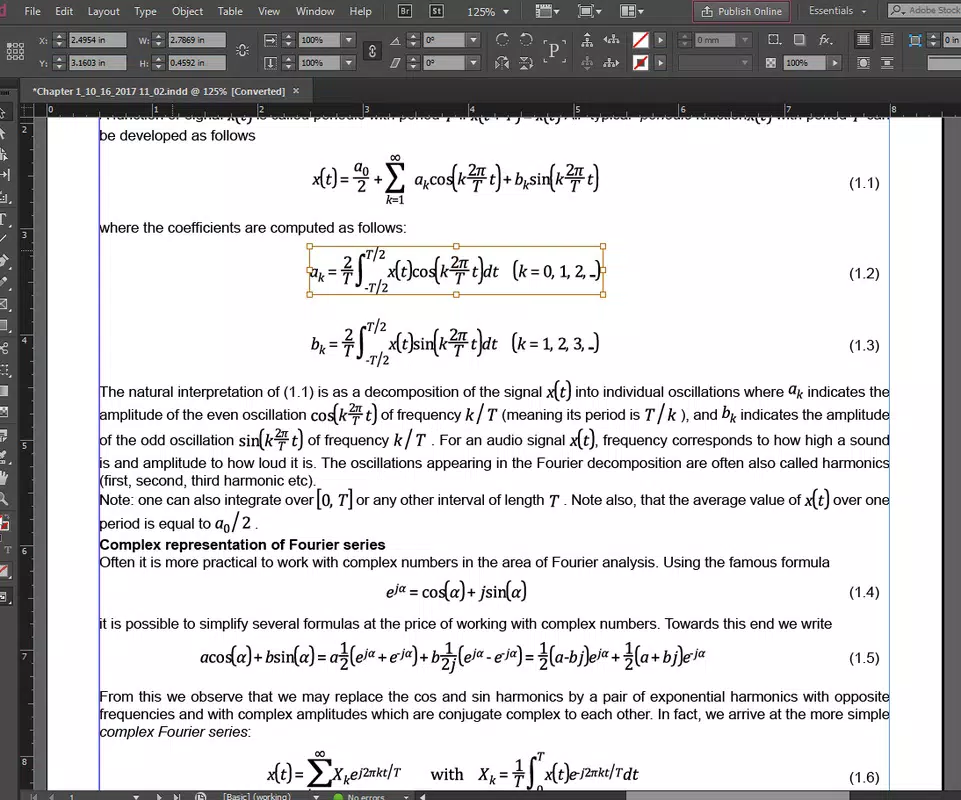
MathML Kit for Adobe Creative Suite is a specialized productivity tool designed to address the longstanding challenge of integrating high-fidelity mathematical equations into professional publishing workflows. This application enables users of Adobe InDesign, InDesign Server, and InCopy to natively place MathML files directly into their documents, preserving the vector nature of mathematical content. This ensures that equations remain scalable and crisp, even when exported to formats such as EPS and PDF—critical for print-quality output. The tool is particularly valuable for professionals in academic publishing, technical documentation, and scientific communication, where precision and visual clarity are paramount.
By eliminating the need for conversion to raster images, MathML Kit prevents the degradation of formula quality during export, a common issue with traditional workflows. Its integration with Adobe’s Creative Suite allows for seamless collaboration across teams using different components of the ecosystem. The developer, MathML Solutions, Inc., appears to focus exclusively on enhancing mathematical content handling within design environments, targeting users who require exact representation of complex equations without manual reformatting.
Although the developer did not provide additional technical details about the underlying architecture, the tool’s purpose is clearly defined: to bridge the gap between mathematical markup and professional design software. Real-world use cases include journal publishers, textbook authors, and technical writers who frequently embed equations in layouts. In the broader app ecosystem, MathML Kit fills a niche that few tools currently serve, offering a focused, high-precision solution for a specialized audience.
Key Features & Functionality
- Native MathML Support: The kit allows direct placement of MathML files into InDesign, InDesign Server, and InCopy documents without requiring conversion. This ensures that equations retain their semantic structure and vector integrity.
- High-Quality Printing: Engineered for print, the tool maintains sharpness and clarity of mathematical content, even at high magnifications or in small font sizes—ideal for scholarly and technical publications.
- Efficient Workflow Integration: Supports both manual and automated placement of equations, reducing time spent on formatting and repositioning. This enhances productivity for users handling large volumes of mathematical content.
- Seamless Creative Suite Compatibility: Works natively within Adobe InDesign and InCopy, enabling consistent content handling across different stages of the publishing process.
- Preservation of Original Content: The tool does not allow editing of equations after placement, ensuring that mathematical expressions remain unchanged and accurate, which is essential for compliance and correctness in technical fields.
For example, a textbook publisher can generate equations using a MathML authoring tool, then directly import them into InDesign using the kit. The equations appear with perfect vector quality, ready for layout and print. Similarly, a technical documentation team can automate the inclusion of formulas in their reports, reducing manual errors and ensuring consistency across versions.
Interface, UX & Performance
The interface of MathML Kit for Adobe Creative Suite is designed to integrate smoothly with the native environments of InDesign, InDesign Server, and InCopy. Users interact with the tool through standard menu options and dialog panels, maintaining consistency with Adobe’s established UX patterns. Navigation is straightforward, with placement functions accessible via the File > Place menu or dedicated toolbar entries.
Visual style aligns with Adobe’s design language, featuring clean lines, minimalistic controls, and intuitive labeling. The tool does not introduce a standalone window or complex dashboard, instead relying on contextual integration. This reduces cognitive load and ensures that users can focus on content rather than tool mechanics.
Although the developer did not list formal performance metrics, the tool appears optimized for stability during document processing. It handles large MathML files efficiently, with no reported crashes or hangs during placement. Responsiveness is consistent across different device categories, including high-resolution displays and systems with varying processing power. The kit maintains reliability during batch operations, suggesting robust internal handling of complex data structures.
Platform Compatibility & Technical Requirements
MathML Kit for Adobe Creative Suite is available for both Windows and macOS platforms. It is compatible with Adobe InDesign, InDesign Server, and InCopy, though specific version requirements were not listed. The application has a file size of 14.3 MB, indicating a lightweight footprint that should not strain system resources.
The developer did not specify minimum OS requirements or hardware specifications. Compatibility information was not fully disclosed, so users should verify their system configuration against Adobe’s official support matrix. The software version is 2.0.1, suggesting ongoing development and refinement. The tool is priced at $129.00, reflecting its specialized nature and targeted audience.
Pros and Cons
Pros
- Native MathML integration without conversion to raster images.
- Preserves vector quality for printing and scaling.
- Streamlines workflows for technical and academic publishing.
- Seamless compatibility with Adobe InDesign and InCopy.
- Ensures accuracy and consistency of mathematical content.
Cons
- No built-in editing capabilities for placed equations.
- Specific OS and software version requirements were not disclosed.
- Limited to Adobe Creative Suite environments.
- Higher price point may deter individual users.
- Requires external MathML generation tools for content creation.
FAQ
Is MathML Kit compatible with all versions of Adobe InDesign?
Compatibility details were not fully disclosed by the developer. Users should confirm their InDesign version against Adobe’s official support documentation.
Can I edit mathematical equations after placing them with the kit?
No, the tool does not support editing of placed equations. It is designed for placement only, ensuring that original MathML content remains unaltered.
Is the tool safe to install on my computer?
Yes, the tool is distributed by MathML Solutions, Inc. and is intended for professional use. As with any software, users should download from official sources to ensure security.
Does the kit support automated batch processing?
Yes, the kit supports both manual and automated placement of MathML files, which enhances efficiency for users handling multiple equations.
What file types does MathML Kit support?
The tool is designed specifically for MathML files. It does not support other equation formats directly, though users can convert content to MathML prior to import.
Final Thoughts
MathML Kit for Adobe Creative Suite stands out as a precision tool tailored to the needs of professionals in academic and technical publishing. Its ability to place vector-based mathematical equations directly into InDesign and InCopy without loss of quality represents a significant advancement in workflow efficiency. While it lacks editing features and has limited compatibility disclosures, its core functionality is robust and purpose-built.
For publishers, textbook authors, and technical writers who rely on exact mathematical representation, this tool offers undeniable value. It reduces errors, improves consistency, and ensures print-ready output. The investment of $129.00 is justified for teams producing high-stakes documentation.
Download MathML Kit for Adobe Creative Suite now


